| Primary - The Primay storage in computers is memory that the computers uses for the major storing of data such as in RAM, CMOS, BIOS, and Cache |
| Secondary - The secondary storage in computers in memory that the computer uses for the minor storing of data or data that is less important than that that is stored in the primary. |
| Primary Cache- |
| Internal Cache- Fast memory for the cpu instructions that is embedded into the chip. |
| L1 Cache- Fast internal memory for the cpu instruction. |
| L2 Cache- Fast external memory for the cpu instruction. |
| Secondary Cache- |
| Backside bus- Connects the CPU to L1 cache. |
| Front Side- Connects the CPU to L2 cache. |
| Static RAM is RAM that doesn't have to be refreshed every second. It is generally fast and more expensive than dynamic RAM. |
| Dymanic Ram is Ram that has to be refreshed a to lower that static RAM. Because of the speed difference and the fact that dymanic RAM must be refreshed it is cheaper. |
| RAM |
| CMOS |
| BIOS |
| HD |
| Floppy |
| CD-R/W |
| Zip |
| Jazz Drive |
| RAM drive |
| Cache |
| Space on a HD |
| Space on a FD |
| Space on any storage device |
| Free space |
| Used space |
| Virtual memory |
| Dual-Ported means that it can be accessed by both the processor on the graphics adapter and the system CPU simultaneously, providing almost instant data transfer. |
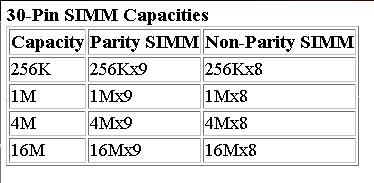
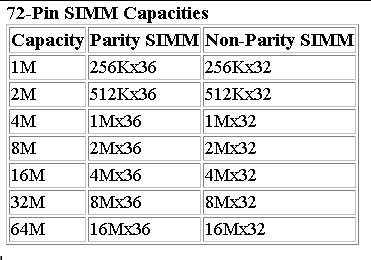
| Parity - As data moves through your computer (e.g. from the CPU to the main memory), the possibility of errors can occur . . . particularly in older 386 & 486 machines. Parity error detection was developed to notify the user of any data errors. By adding a single bit to each byte of data, this bit is responsible for checking the integrity of the other 8 bits while the byte is moved or stored. Once a single-bit error is detected, the user receives an error notification; however, parity checking only notifies, and does not correct a failed data bit. If your SIMM module has 3, 6, 9, 12, 18, or 36 chips then it is more than likely Parity. |
| Non-Parity - These modules are just like Parity modules without the extra chips. There are no Parity chips in Apple Computers, later 486, and most Pentium class systems. The reason for this is simply because memory errors are rare, and a single bit error will most likely be harmless. If your SIMM module has 2, 4, 8, 16, or 32 chips, then it is more than likely Non-Parity. Always match the new memory with what is already in your system. To determine if your system requires parity, count the number of small, black, IC chips on one of your modules. |
| ECC - Error Correction Code modules are an advanced form of Parity detection often used in servers and critical data applications. ECC modules use multiple Parity bits per byte (usually 3) to detect double-bit errors. They also will correct single-bit errors without creating an error message. Some systems that support ECC can use a regular Parity module by using the Parity bits to make up the ECC code. However, a Parity system cannot use a true ECC module. |
| They have to be in pairs because they have to fill a single bank. |
|
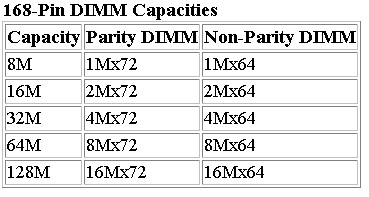
IBM compatibles have two main physical types of SIMMs--30-pin (9 bits) and 72-pin (36 bits)--with various capacities and other specifications. The 30-pin SIMMs are smaller than the 72-pin versions, and may have chips on either one or both sides. 30-pin SIMMs are on the wane, primarily because 64-bit systems--which would require eight 30-pin SIMMs per bank--are now the industry standard. DIMMs, which have become popular on Pentium-MMX and Pentium Pro-based systems, are 168-pin units with 64-bit (non-parity) or 72-bit (parity) data paths. |